

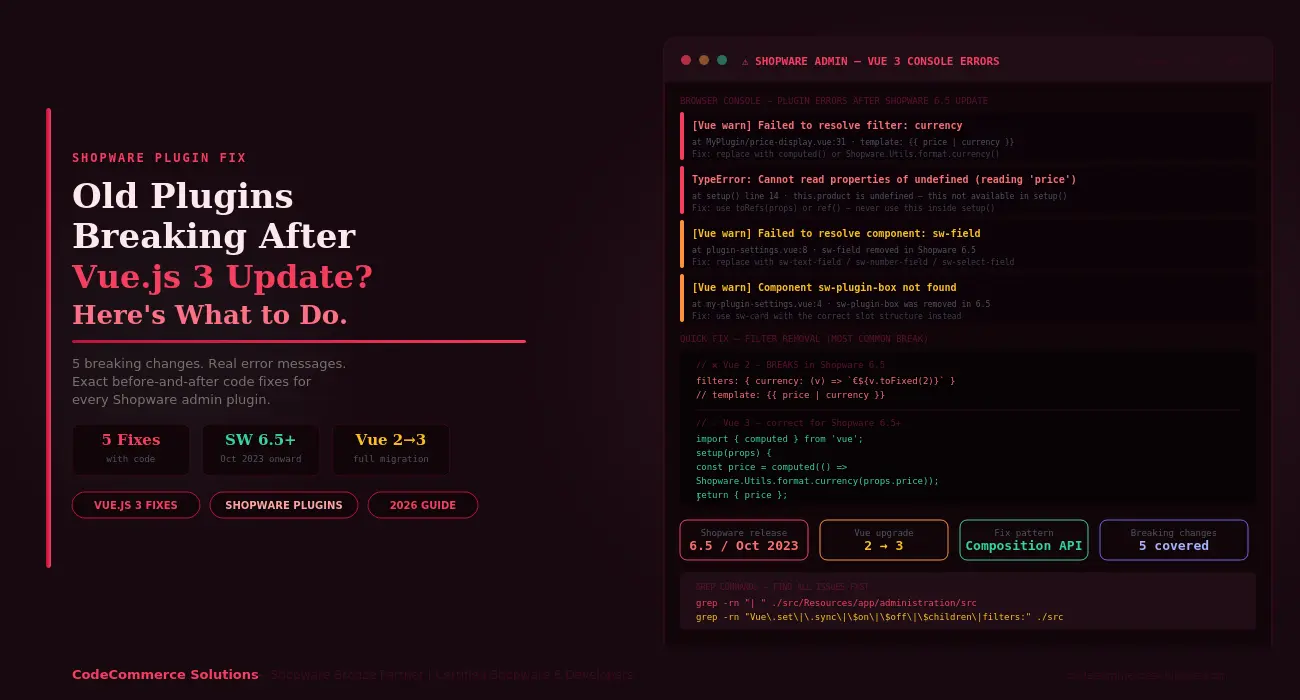
Any Shopware Vue.js 3 plugin built before 2023 may break in Shopware 6.5. That is when Shopware shipped Vue.js 3. It replaced Vue.js 2 with Vue.js 3 across the entire admin panel. But Vue 3 is not backwards-compatible with Vue 2. Several APIs were removed. The rendering model also changed. So plugins written for Vue 2 stopped working.
Vue 3 plugin support is the main challenge in Shopware 6.5. Storefront plugins written in plain JavaScript or Twig are not affected. Does your issue appear in the admin panel? Settings pages, product tabs, custom modules — this guide covers all of them.
Open Chrome DevTools on the Shopware admin. Press F12. Then go to the Console tab. Reload the page. Each error maps to one of the five breaks below. Fix them in order from the top.
Two Layers of Change
A broken Shopware Vue.js 3 plugin usually fails for two reasons at once. First, Vue itself removed several APIs. Second, Shopware changed its own component wrapper and registration system at 6.5. A plugin may need fixes from both layers. Start with the console errors. They tell you exactly where to look.
Break 1: Vue Filters Removed — Templates Still Using Pipes.
Vue 2 had a filter system. You wrote {{ price | currency }} in a template. But Vue 3 removed filters entirely. Every plugin template using the pipe character fails at runtime. The component renders blank or throws an error.
This is the most common Shopware admin Vue 3 break. After all, filters were everywhere in Vue 2 plugins. Price display, date formatting, string truncation — all of it used filters. Vue 3 replaced them with computed() properties and utility functions.
Shopware ships its own formatting utilities. So you do not need to write your own. Use Shopware.Utils.format.currency() for prices and Shopware.Utils.format.date() for dates. Both work correctly in all Shopware 6.5 plugin contexts.
export default {
filters: {
currency: (value) => `€${value.toFixed(2)}`,
dateFormat: (value) => new Date(value).toLocaleDateString()
}
}
// template: {{ price | currency }}// ✅ Vue 3 — correct for all Shopware 6.5 plugins
import { computed } from ‘vue’;
setup(props) {
const formattedPrice = computed(() =>
Shopware.Utils.format.currency(props.price)
);
return { formattedPrice };
}
// template: {{ formattedPrice }}
- ✦Find every broken filter fast. Run this command in your plugin root:
grep -rn "| " ./src/Resources/app/administration/src --include="*.html.twig". Every line returned has a filter that needs replacing. - ✦For currency, use
Shopware.Utils.format.currency(value, currencyIsoCode, locale). It handles currency symbols, decimal places, and locale formatting in one call. No custom logic needed. - ✦For dates, use
Shopware.Utils.format.date(value, options). Pass a standardIntl.DateTimeFormatoptions object as the second argument. This replaces{{ date | date }}completely.
Developer Insight from CodeCommerce Solutions
Here is a real example. A B2B pricing plugin had 18 templates using pipe filters. Price, discount rate, date, and weight were all formatted this way. One grep command found all 18. We replaced each with a computed property using Shopware’s format utilities. Total fix time: two hours. The plugin worked in Shopware 6.5 without any other changes.
Break 2: this Inside setup() Is Undefined.
Vue 2 plugins used the Options API. All reactive data lived in a data() function. You accessed it with this.myValue anywhere in the component. But in Vue 3, setup() runs before the component instance exists. So this is undefined inside setup().
The Options API still works in Vue 3. But you must use it consistently. The break happens when a plugin mixes both APIs. It uses setup() but still calls this.xxx inside it. This is the second most common Shopware Vue.js 3 plugin error.
setup() {
const price = this.product.price; // TypeError
const name = this.$store.getters.myGetter; // TypeError
}// ✅ Pure Composition API — correct for Shopware 6.5
import { ref, toRefs } from ‘vue’;
setup(props) {
const { product } = toRefs(props);
const price = ref(product.value.price);
// For Vuex store, use Shopware’s store service:
const myValue = Shopware.State.get(‘myModule’).myGetter;
return { price, myValue };
}
- ✦Find all affected files fast:
grep -rn "this\." ./src/Resources/app/administration/src --include="*.js" | grep -A2 "setup()". Anythis.call inside asetup()block will fail. - ✦The Shopware Composition API way to access props: use
toRefs(props). This converts each prop into a reactive ref. Access the value withmyProp.value. Changes to props stay reactive. - ✦In the Shopware Composition API, replace
this.$storewithShopware.State.get('moduleName'). Shopware’s state service works withoutthis. It is accessible anywhere in a Shopware 6.5 plugin’ssetup()function. - ✦Lifecycle hooks inside
setup()use new names. Import them from Vue:onMounted,onBeforeUnmount,onUpdated. A pure Options API component still works. You can keepmounted()as an object key. Just never mix it withsetup()code.
Shopware Admin Plugin Broken After Vue.js 3 Update?
CodeCommerce Solutions is a Shopware Bronze Partner. Our certified Shopware 6 developers migrate Vue 2 plugins to Vue 3. Every fix includes full test coverage across all five breaking changes.
Break 3: Shopware.Component.extend() Fails in Admin.
Many Shopware admin plugins used Shopware.Component.extend() to override core admin views. This let plugins add fields to any admin page. You could extend the product detail view or the order screen. However, Shopware 6.5 changed how overrides bind to the Vue 3 rendering tree. So in the admin, extend() no longer works correctly.
The Shopware admin Vue 3 failure is often silent. The admin loads normally. No console error appears. But the plugin’s changes are simply gone. The product detail page shows no extra fields. The order view looks untouched. This makes it one of the harder breaks to spot.
Shopware.Component.extend(‘sw-product-detail’, {
template: `<template>…</template>`,
data() { return { myField: null }; }
});// ✅ Shopware 6.5 — use override() with Composition API
import { ref } from ‘vue’;
Shopware.Component.override(‘sw-product-detail’, {
template: `<template>…</template>`,
setup() {
const myField = ref(null);
return { myField };
}
});
- ✦Switch from
extend()tooverride(). This is not just a rename. Theoverride()method hooks into Vue 3’s component tree correctly. Theextend()method does not. Move all reactive state into asetup()function. Useref()orreactive()instead of thedata()function. - ✦Note:
extend()still works for storefront plugins. It is only broken in the Shopware admin context. If your plugin touches both the storefront and the admin, treat them separately. The rules differ for each side. - ✦Check component names when overriding. Shopware 6.5 renamed several core admin components. Calling
override()on a component that no longer exists fails silently. The admin loads. Your changes never apply. Cross-check names against the Shopware component changelog for 6.5.
Developer Insight from CodeCommerce Solutions
Here is what this looked like on a live project. A client’s product detail plugin had eight extend() calls across three files. After the upgrade to Shopware 6.5, all eight custom fields disappeared. No console errors appeared. We replaced all eight with override() and moved the data to setup(). Every field returned after a cache clear.
Break 4: Removed Admin Components in Shopware 6.5.
Shopware also updated its own admin component library at 6.5. Several components were removed. Others were split into typed versions. So a Shopware 6.5 plugin using an old component name gets a Vue warning. That slot renders nothing at all.
The most common culprit is sw-field. It was a generic field component in Shopware 6.4. It accepted a type attribute. In 6.5, each type became its own dedicated component. You must now use sw-text-field, sw-number-field, sw-select-field, and so on.
| Old Component (removed in SW 6.5) | Replacement in SW 6.5 |
|---|---|
sw-field (generic) |
sw-text-field, sw-number-field, sw-select-field. |
sw-plugin-box |
sw-card with the correct slot layout. |
sw-contextual-field |
sw-block-field with slot structure. |
sw-settings-item |
Removed. Rebuild with sw-card and router links. |
sw-multi-tag-ip-select |
sw-multi-tag-select (IP variant removed). |
sw-form-field-renderer |
sw-field-copyable or typed field components. |
- ✦Find all
sw-component names in your plugin templates:grep -rn "<sw-" ./src/Resources/app/administration/src --include="*.html.twig". Each name should appear in the Shopware 6.5 Meteor Component Library. Any name not in the library needs a replacement. - ✦When replacing
sw-field, check the props too. Typed field components have different prop names.sw-text-fieldusesv-modeldirectly.sw-number-fieldaccepts:min,:max, and:stepprops. These did not exist on the oldsw-field. - ✦Browse the Shopware Meteor Component Library on Storybook to preview each replacement component. It shows every slot, prop, and event. This saves time when updating complex form layouts with many fields.
Break 5: Vue 2-Only APIs Still in Plugin Code.
Vue 3 also removed several global APIs. Older plugins used them heavily. These do not always throw obvious errors. Some fail silently. Others throw a TypeError deep in a component tree. Without knowing the cause, it is hard to trace.
Run this one command across your entire Shopware 6.5 plugin source. It finds every removed API in one pass.
grep -rn “Vue\.set\|Vue\.delete\|\.sync\|\$on(\|\$off(\|\$children\|\$listeners” \
./src/Resources/app/administration/src
Each result in that output is a line to fix. Here is the replacement for each one.
Vue.set(this.product, ‘newField’, value);
product.newField = value; // Vue 3 proxy handles reactivity// ❌ .sync modifier — removed in Vue 3
<my-comp :value.sync=”price” />
<my-comp v-model:value=”price” />// ❌ Global event bus — $on/$off removed in Vue 3
this.$on(‘price-updated’, handler);
// Use Shopware’s EventBus service:
Shopware.Application.getContainer(‘service’)
.shopwareDiscountSurchargeService // or any service
// or use Vue 3 provide/inject for parent-child events
// ❌ $children — removed in Vue 3
this.$children[0].doSomething();
// Use template refs:
const childRef = ref(null); // <child-comp ref=”childRef” />
childRef.value.doSomething();
- ✦
Vue.set()andVue.delete()are gone. Vue 3 uses JavaScript Proxy under the hood. Direct object mutation is reactive. You can writeobj.newProp = valueand Vue will detect it. No helper needed. - ✦The
.syncmodifier maps directly tov-model:propName. If you had:title.sync="myTitle", writev-model:title="myTitle"instead. Update the child component to emitupdate:titlerather thanupdate:sync. - ✦
$listenersis also gone. In Vue 3,$attrsnow includes event listeners. If your plugin passed listeners through withv-bind="$listeners", change it tov-bind="$attrs". AddinheritAttrs: falseto the component options if needed.
Need the Full Migration Done by Certified Developers?
Our Shopware Bronze Partner team handles the full Vue.js 3 plugin migration. We cover all five breaks. Every admin flow gets tested. Zero console errors on delivery — that is our standard.
Shopware Vue.js 3 Plugin: Quick Reference Table.
| What Broke | Console Error | Fix |
|---|---|---|
| Pipe filters in templates. | Failed to resolve filter. | Use computed() or Shopware.Utils.format. |
this.xxx inside setup(). |
Cannot read properties of undefined. | Use Shopware Composition API: ref(), reactive(), toRefs(props). |
Shopware.Component.extend() in admin. |
Silent failure or $el undefined. |
Use override() with Shopware Composition API setup(). |
Old sw-field, sw-plugin-box. |
Failed to resolve component. | Use typed field components and sw-card. |
Vue.set(), .sync, $on/$off. |
TypeError or silent failure. | Direct assignment, v-model:prop, template refs. |
Shopware Vue.js 3 Plugin: Diagnostic Checklist.
- Open Chrome DevTools on the Shopware admin. Read and copy every Console error and Vue warning.
- Run
grep -rn "| " ./src --include="*.html.twig". Fix every pipe filter found. - Run
grep -rn "this\." ./src --include="*.js". Check each result inside asetup()block. - Run
grep -rn "Component.extend" ./src. Change each admin override toComponent.override(). - Run
grep -rn "<sw-" ./src --include="*.html.twig". Check each component name against the Shopware 6.5 library. - Run
grep -rn "Vue\.set\|\.sync\|\$on\|\$off\|\$children" ./src. Fix each result using the patterns above. - Run
php bin/console cache:clearon your staging server. Reload the admin. Confirm zero console errors. - Test every admin flow the plugin touches. Plugin pages, product detail tabs, order list views, config panels.
Why Choose CodeCommerce Solutions.
In most cases, Shopware admin plugins need fixes from more than one break. Filters and this inside setup() often appear together. A plugin that uses sw-field usually also has Vue.set calls nearby. So fixing one break reveals the next. You need someone who knows the full list.
CodeCommerce Solutions is a Shopware Bronze Partner. Our certified developers have migrated B2B plugins, marketplace plugins, and full admin modules. All from Vue 2 to Vue 3. We start with the diagnostic grep commands above. Then we fix each break. The admin gets fully tested. We confirm zero errors before we ship.
We also audit third-party plugins on your store for Shopware plugin compatibility. Some have already released Vue 3-ready versions. Others have not. So we identify which need updating and which need a custom patch.
Official Documentation
Shopware published a full Vue.js 3 migration guide for plugin developers. See the Shopware Vue.js 3 migration guide in the developer docs. It lists every removed API, renamed component, and Shopware Composition API composable.
Fix Your Shopware Vue.js 3 Plugin Today.
The Shopware Vue.js 3 plugin migration has a clear path. First, run the five grep commands. Then read the console errors. Fix each break in order. Most plugins are working again after two to four hours.
Start with Break 1 — filters. That is the most common Shopware Vue.js 3 plugin error. It also has the fastest fix. Then check for this inside setup(). These two breaks fix 80% of all Shopware admin Vue 3 problems.
Need a developer to handle the full Vue.js 3 plugin migration? CodeCommerce Solutions is a Shopware Bronze Partner. We fix broken plugins fast. Every admin flow gets test coverage.