

Black Friday is the highest-stakes day your Shopware store will face all year. Traffic spikes 5x to 20x above your daily average within minutes of your campaign going live. Most Shopware stores are never tested at that scale. They find out their limits on the day itself — when a slow checkout or a server timeout costs real revenue in real time.
This guide covers every layer of Shopware Black Friday preparation: server configuration, caching, database tuning, load testing, and a deployment freeze checklist. Work through each section in the order it appears. Most stores that go down on Black Friday have three things wrong simultaneously — and each one is fixable weeks in advance.
Performance fixes, cache configuration changes, and hosting upgrades all need time to test and stabilise. Changes made the week before the event are untested under real load. Changes made four weeks out can be load tested, verified, and safely rolled back if something breaks.
How Shopware Handles Traffic Under Load
Shopware 6 runs on PHP-FPM. Every storefront request goes through the Symfony kernel, resolves dependency injection services, runs DAL queries against MySQL, and renders through Twig. At normal traffic this pipeline runs in 150ms to 300ms. At 10x your normal concurrent load, three hard bottlenecks appear at the same time.
The first is the PHP-FPM worker pool. When all workers are busy, new requests queue. Queue time adds directly to response time. The second is MySQL connection exhaustion — each PHP worker holds one connection, and when workers outnumber available connections, queries wait. The third is disk I/O: Shopware reads sessions, cache files, and compiled containers from disk unless Redis is configured. Under load, disk reads contend with each other and I/O wait climbs.
The result is a performance cliff. The store handles 50 concurrent users smoothly. At 200 it falls over completely. Shopware Black Friday traffic does not ramp up gently — it arrives in a spike the moment your email goes out.
Install k6 or Apache Bench. Run a ramp test: start at 5 users, ramp to 200 over 3 minutes, hold for 5 minutes. Point it at your product listing page and checkout URL. Note exactly where p95 response time breaks past 2 seconds. That is your current ceiling. Every fix you apply should move that ceiling up.
Step 1: Enable and Verify HTTP Caching
Every uncached GET request hits PHP and MySQL. At Shopware Black Friday scale, this is fatal.
Shopware has a built-in HTTP cache. When enabled, it caches full page responses. Subsequent requests for the same URL return the cached copy without touching PHP or MySQL at all. A 95% cache hit rate means only 1 in 20 requests reaches your server stack — the other 19 return in under 10ms.
Most Shopware stores have HTTP caching enabled but misconfigured. The cache exists but never actually serves cached pages because the TTL is too short, cookie variations invalidate it constantly, or cache invalidation fires on every admin save.
# .env
SHOPWARE_HTTP_CACHE_ENABLED=1
SHOPWARE_HTTP_DEFAULT_TTL=7200
After enabling, verify it is actually working. Run curl -I https://your-store.com/your-category-url twice. The second response must include X-Cache: HIT. If it shows MISS on every request, the cache is enabled but not serving. The most common cause is a missing TRUSTED_PROXIES setting.
# .env — add your load balancer or Varnish IP
TRUSTED_PROXIES=10.0.0.1
Shopware Black Friday preparation always starts here. A fully warmed HTTP cache is the single highest-impact change available. Every other fix in this guide matters less if the HTTP cache is not working.
- Warm the cache before the sale starts. Crawl your top 100 product and category URLs before the first customer arrives. A cold cache means the first traffic wave hits your PHP stack raw.
- For Varnish users: Shopware sends
Cache-Control: no-cacheon pages with active promotions if the promotion plugin is misconfigured. Check your Varnish logs on staging with promotions active before the event. - Do not cache the cart, account, checkout, or wishlist pages. These are session-specific. Serving a cached cart to the wrong user is a critical bug, not just a performance issue.
Shopware Store Not Ready for Black Friday Traffic?
CodeCommerce Solutions is a certified Shopware partner. Our developers run structured load tests against your store with production-like data, identify your exact performance ceiling, and apply the fixes that hold under real traffic.
Step 2: Configure Redis for Sessions and Application Cache
File-based sessions create I/O contention under load. Redis eliminates this entirely.
PHP uses file locking for sessions. Two concurrent requests from the same session block each other — the second waits until the first releases the lock. On Shopware Black Friday, many customers browse simultaneously. Session file locks queue. Response times climb without any query count increase.
Redis uses atomic operations. No file locking. No queue. 500 concurrent session reads complete in parallel. Moving sessions to Redis is one of the fastest wins available for Shopware performance optimization under load.
# .env
REDIS_URL="redis://127.0.0.1:6379"

# config/packages/framework.yaml
framework:
  session:
    handler_id: "redis://127.0.0.1:6379"
Also move the Shopware application cache to Redis. The app cache includes compiled routes, DI container, and event subscriber maps. Without Redis, every PHP worker reads these from disk on first access.
# config/packages/cache.yaml
framework:
  cache:
    app: cache.adapter.redis
default_redis_provider: "redis://localhost:6379"- Use separate Redis database indexes for sessions and app cache. Sessions have high churn and short TTLs. App cache objects are long-lived. Use
redis://localhost:6379/1for sessions andredis://localhost:6379/2for app cache. - Set the
allkeys-lrueviction policy. Without this, Redis returns errors when memory is full — which breaks sessions entirely. - Allocate at least 1GB to Redis for a store expecting Shopware Black Friday traffic. Session data volume is proportional to concurrent users.
Step 3: Tune PHP-FPM and MySQL Connection Limits
Most Shopware Black Friday crashes happen because PHP-FPM workers and MySQL connections run out simultaneously.
PHP-FPM has a worker pool. The size of this pool is set by pm.max_children. Each worker handles one request at a time. When all workers are busy, new requests wait in a queue. MySQL has a connection limit set by max_connections. Each PHP-FPM worker holds one connection during a request. If pm.max_children exceeds max_connections, workers queue waiting for a database connection — and response times spike vertically.
# /etc/php/8.x/fpm/pool.d/www.conf
pm = dynamic
pm.max_children = 80
pm.start_servers = 20
pm.min_spare_servers = 10
pm.max_spare_servers = 30
pm.max_requests = 500
The formula for pm.max_children: available_RAM_MB / average_PHP_worker_MB. A typical Shopware worker uses 64MB to 96MB. On an 8GB server with 6GB available for PHP, set pm.max_children = 70. Then set max_connections in MySQL to at least 90 for headroom.
# /etc/mysql/mysql.conf.d/mysqld.cnf
max_connections = 120
wait_timeout = 60
interactive_timeout = 60
innodb_buffer_pool_size = 4G- Set
wait_timeout = 60. Without this, idle PHP workers hold MySQL connections open indefinitely — wasting your entire connection budget on workers doing nothing. - Consider ProxySQL for connection pooling if your store expects over 500 concurrent users. ProxySQL multiplexes many PHP connections onto a smaller number of real MySQL connections. 600 PHP workers can share 80 MySQL connections.
- Monitor
Threads_connectedin real time during your load test. When it approachesmax_connections, you need either more connections or a connection pooler.
Step 4: Address N+1 Queries and Missing Database Indexes
A product listing endpoint that fires 600 queries at normal traffic will fire 60,000 queries per minute on Black Friday.
Shopware’s DAL loads associations lazily by default. If your product listing endpoint does not declare associations explicitly, Shopware fetches manufacturer, media, and variant data with a separate query per product. A 50-product listing runs 150 to 600 SQL queries per request before any load is applied.
The fix is eager loading. Add addAssociation() calls to your Criteria objects before queries run. This is also covered in our Shopware API performance guide with detailed before-and-after benchmarks.
// BEFORE — N+1: associations fetched per product
$criteria = new Criteria();
$criteria->setLimit(50);

// AFTER — eager loading: all associations in one batch
$criteria = new Criteria();
$criteria->setLimit(50);
$criteria->addAssociation('manufacturer');
$criteria->addAssociation('media');
$criteria->addAssociation('properties.group');
Also check for missing indexes on custom filter columns. If your store filters by a value stored in Shopware’s JSON custom_fields column, MySQL performs a full table scan per request. On a catalog of 100,000 products, this single query can take 400ms to 800ms.
-- Add a generated column + index for custom field filtering
ALTER TABLE product
  ADD COLUMN material_code VARCHAR(64)
    GENERATED ALWAYS AS (custom_fields->>'$.material_code') STORED,
ADD INDEX idx_material_code (material_code);- Check your query count using the Symfony profiler with
APP_ENV=dev. The Database tab shows every query per page load. Any listing page above 50 queries has an N+1 problem. - Use
pt-query-digestfrom Percona Toolkit after your load test. It ranks queries by total cumulative time — not just worst single execution. - Only load associations you actually serialize in the response. Fetching the full category tree when you only need
category.namewastes both query time and memory.
Running a Load Test Before Black Friday?
Our Shopware Bronze Partner team profiles your store against production catalog data. We identify N+1 queries, missing indexes, and cache misconfigurations — and fix them before the traffic arrives.
Step 5: Run a Structured Load Test and Find Your Ceiling
You cannot fix what you have not measured. A load test before Shopware Black Friday is not optional.
Install k6. Write a test that simulates realistic Black Friday behaviour — product listing pages, product detail pages, and checkout simultaneously. A test that only benchmarks the homepage tells you nothing useful.
// k6 black-friday-test.js
import http from 'k6/http';
import { sleep } from 'k6';

export const options = {
  stages: [
    { duration: '2m', target: 50 },
    { duration: '5m', target: 200 },
    { duration: '3m', target: 500 },
    { duration: '2m', target: 0 },
  ],
  thresholds: {
    http_req_duration: ['p95<2000'],
    http_req_failed:   ['rate<0.01'],
  },
};

export default function () {
  http.get('https://staging.your-store.com/category-url');
  sleep(1);
  http.get('https://staging.your-store.com/product-url');
  sleep(2);
}
Run this against your staging environment with a production-size database. A staging test against a 50-product database tells you nothing about how the store handles a 50,000-product catalog under load.
| Metric | Healthy Target | Action if Breached |
|---|---|---|
| p95 response time at peak | Under 2,000ms | Identify bottleneck from other metrics |
| PHP-FPM queue length | Zero under load | Raise pm.max_children or add workers |
MySQL Threads_connected |
Below 70% of max | Add ProxySQL or raise connection limit |
| Server I/O wait | Under 5% | Move sessions and app cache to Redis |
| Redis hit rate | Above 90% | Raise TTL or increase Redis memory |
| DB queries per listing page | Under 10 | Fix N+1 queries with eager loading |
- Run the load test twice — before and after your fixes. The before-and-after comparison is your evidence that the store is ready for Shopware Black Friday.
- Include a checkout simulation in the load test. Cart and checkout flows are not cacheable. A store that handles 500 concurrent product page views but fails at 50 concurrent checkouts will still lose Black Friday revenue.
Step 6: Freeze Deployments and Prepare a Rollback Plan
More Shopware stores go down on Black Friday from a last-minute deployment than from traffic alone.
A plugin update deployed two days before the event can break the checkout. A theme change deployed the night before can clear the HTTP cache and send 100% of traffic to PHP cold. Freeze all deployments at least 72 hours before Black Friday. No plugin updates, no theme changes, no configuration changes, no infrastructure changes.
- Set up a rollback procedure before the event. Test the rollback on staging. A rollback procedure you have never executed is a rollback procedure that will fail under pressure.
- Take a full database backup 24 hours before Black Friday and another one 2 hours before. Store them off-server.
- Set up monitoring with alerts before the event. Alert when p95 response time exceeds 3 seconds, when MySQL
Threads_connectedexceeds 80% ofmax_connections, or when error rate exceeds 0.5%. - Keep a developer on call during the event window — not to deploy changes, but to diagnose and triage when alerts fire.
Black Friday Shopware Preparation Checklist
Run through this checklist at least two weeks before Black Friday. Every unchecked item is a risk.
Cache and Redis
-
HTTP cache enabled and verified with
X-Cache: HITon product and category pages -
Cache TTL set to 7200 or higher for product pages
-
Redis configured for sessions and application cache
-
Cache warmed with a crawl of top 100 URLs before the event
Server and PHP
-
pm.max_childrenset based on available RAM -
MySQL
max_connectionsset above PHP-FPM worker count -
wait_timeoutandinteractive_timeoutset to 60 seconds -
ProxySQL considered if expecting 500+ concurrent users
Database
-
Symfony profiler checked on all key listing and product endpoints
-
N+1 queries fixed with eager loading in Criteria objects
-
Slow query log reviewed — no queries above 500ms on listing pages
-
Custom filter columns indexed with generated columns if needed
Load Testing
-
k6 or similar load test run against staging with production-size data
-
p95 response time confirmed under 2,000ms at 200 concurrent users
-
Checkout flow included in load test
-
Before-and-after results documented
Operations
-
Deployment freeze in place 72 hours before event
-
Full database backup taken 24 hours before event
-
Rollback procedure written and tested on staging
-
Monitoring alerts configured for response time, DB connections, error rate
-
Developer on call during event window
Why Choose CodeCommerce Solutions
Most Shopware performance work happens after the crash. A store goes down on Black Friday, loses four hours of revenue, and then gets fixed. The fixes are the same ones that could have been applied three weeks earlier for a fraction of the cost.
CodeCommerce Solutions is a certified Shopware partner. Our team of Shopware 6 developers approaches Shopware Black Friday preparation the same way we approach every performance engagement — with load tests against real data, structured profiling of query counts and response times, and fixes that are verified before they go anywhere near production.
We handle the full stack: HTTP cache configuration, Redis setup, PHP-FPM tuning, MySQL query analysis, and load testing. Every engagement ends with a before-and-after benchmark you can use to confirm the store is ready. If your Black Friday is three weeks away and you have not run a load test yet, that is the place to start.
Final Thoughts
The stores that survive Shopware Black Friday are the ones that ran a load test in October. They found their performance ceiling, fixed the bottlenecks, verified the fixes with a second load test, and froze deployments before the event.
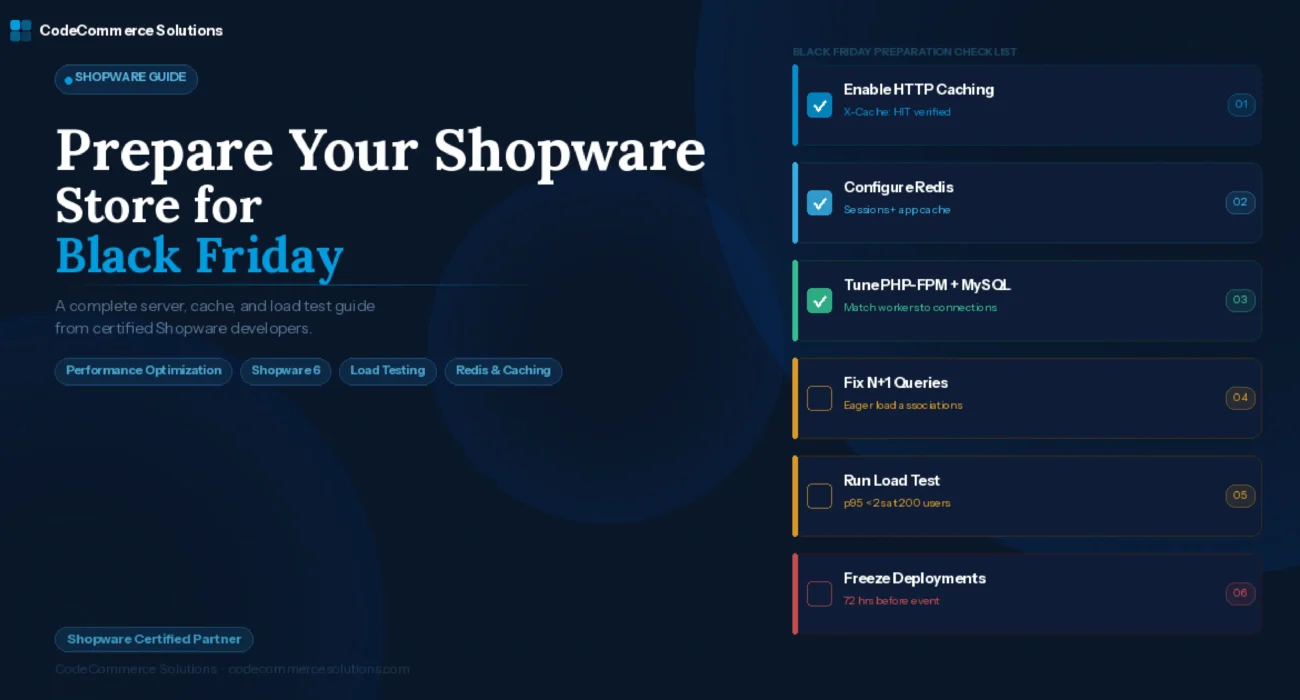
The preparation is not complicated. Enable HTTP caching. Move sessions to Redis. Match your PHP-FPM workers to your MySQL connections. Fix N+1 queries. Run a load test. Freeze deployments. Each step is documented, testable, and reversible. Start with the load test — it tells you exactly which of these steps matters most for your specific store configuration and traffic pattern.
For full details on Shopware HTTP caching, Redis configuration, and performance tuning, see the Shopware 6 performance tweaks documentation. It covers HTTP cache setup, Redis adapter configuration, and server-level optimizations in detail.
Fix Your Shopware Store Before Black Friday, Not After.
CodeCommerce Solutions is a certified Shopware partner with a team of Shopware 6 developers. We run your load test, fix what it finds, and confirm the store is ready — all before the deployment freeze window closes.