

WooCommerce is often the starting point for many online businesses. It’s flexible, open-source, and tightly integrated with WordPress. But as stores grow, WooCommerce can become difficult to scale, maintain, and optimize for performance.
That’s where Shopware comes in.
If you’re researching:
-
WooCommerce to Shopware migration
-
How to migrate WooCommerce to Shopware
-
WooCommerce vs Shopware
-
Shopware migration from WooCommerce
-
WooCommerce to Shopware SEO migration
This guide covers everything you need in one place from strategy and data migration to SEO, costs, timelines, and real-world use cases.
What Is WooCommerce to Shopware Migration?
WooCommerce to Shopware migration is the process of moving an existing WooCommerce (WordPress-based) online store to Shopware 6, including:
-
Products and categories
-
Customers and order history
-
SEO data and URLs
-
Content and media
-
Business logic and integrations
Unlike simple exports, a professional migration ensures no loss of data, rankings, or revenue, while improving performance and scalability.
Why Businesses Migrate from WooCommerce to Shopware
WooCommerce works well for small stores but growing businesses often hit limitations.
Common WooCommerce Pain Points
1. Performance Issues at Scale
WooCommerce relies heavily on:
-
WordPress
-
Multiple plugins
-
PHP execution on every request
As product catalogs and traffic grow, performance suffers.
2. Plugin Dependency & Conflicts
Even basic features require plugins:
-
SEO
-
Security
-
Caching
-
Checkout optimization
This increases:
-
Maintenance effort
-
Compatibility issues
-
Security risks
3. Limited Native B2B Capabilities
Advanced pricing, customer-specific catalogs, and workflows require custom development.
4. Security & Stability Concerns
WordPress-based systems are more vulnerable without constant updates and monitoring.
Why Shopware Is the Ideal Upgrade from WooCommerce
Shopware is built for growth-focused, modern commerce.
Key Benefits of Shopware Over WooCommerce
-
High performance, API-first architecture
-
Native CMS and shopping experiences
-
Better handling of large product catalogs
-
Built-in SEO features
-
Powerful Rule Builder & Flow Builder
-
Native multilingual & multi-currency support
-
Strong B2B & D2C capabilities
-
Lower long-term maintenance cost
For European businesses, Shopware also offers:
-
GDPR-friendly architecture
-
Strong presence in Germany & Austria
-
Enterprise-grade scalability
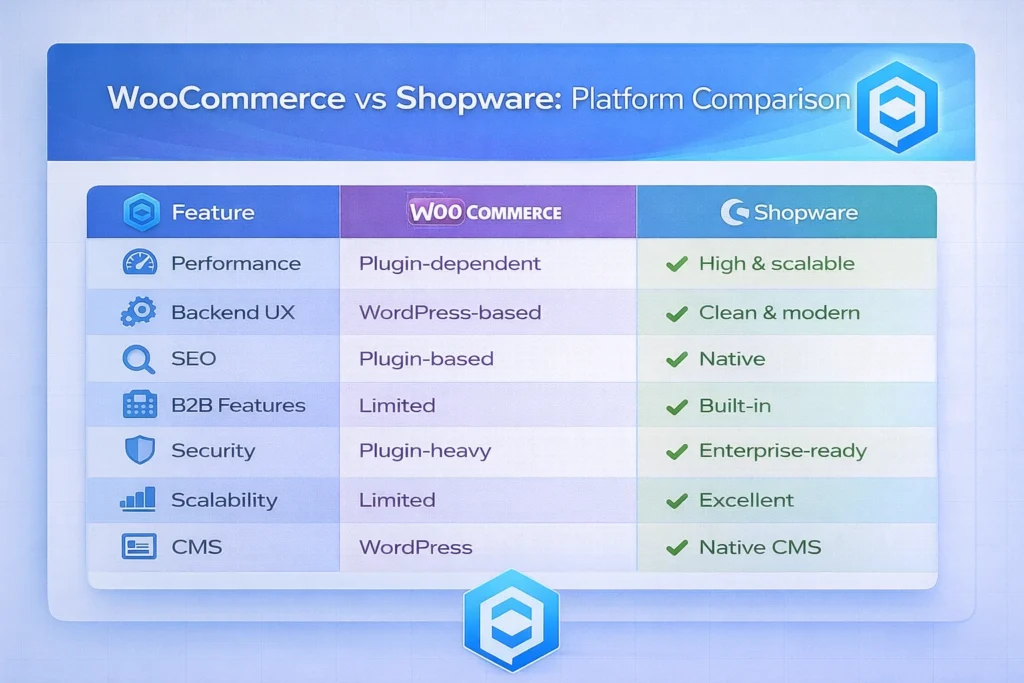
WooCommerce vs Shopware: Platform Comparison
What Can Be Migrated from WooCommerce to Shopware?
Data That Can Be Migrated
-
Products & variations
-
Categories & taxonomies
-
Customers & customer roles
-
Order history
-
Reviews & ratings
-
Product images & media
-
Blog & CMS content
-
SEO meta data
-
URLs & permalinks
What Is Rebuilt or Optimized
-
Theme & storefront design
-
Checkout experience
-
Custom WooCommerce plugins
-
Business logic workflows
-
Performance optimizations
A WooCommerce to Shopware migration service focuses on optimization, not just copying data.
WooCommerce to Shopware Migration Without Losing SEO
One of the most common concerns is:
“Will I lose Google rankings after migrating from WooCommerce to Shopware?”
The answer: No—if SEO migration is handled correctly.
SEO Elements Preserved During Migration
-
URL structure mapping
-
301 redirects
-
Meta titles & descriptions
-
Canonical tags
-
Image alt texts
-
Internal linking
-
Schema data
-
XML sitemaps
-
hreflang (for multilingual stores)
Common SEO Mistakes We Prevent
-
Changing permalinks without redirects
-
Dropping blog content
-
Losing category authority
-
Duplicate URLs from filters
-
Ignoring Core Web Vitals
SEO is planned before the first data is migrated.
WooCommerce to Shopware Migration: Step-by-Step Process
Step 1: WooCommerce Store Audit
-
Plugins & dependencies
-
SEO footprint
-
Database size
-
Performance benchmarks
Step 2: Migration Strategy
-
Data mapping
-
Attribute normalization
-
SEO redirect planning
-
Plugin replacement strategy
Step 3: Data Migration
-
Products, customers, orders
-
Media & CMS content
-
Validation & QA checks
Step 4: Shopware Theme & UX
-
Custom Shopware storefront
-
Mobile-first design
-
UX improvements based on data
Step 5: Integrations
-
Payment gateways
-
Shipping providers
-
ERP / CRM
-
Marketing tools
Step 6: SEO & Performance Optimization
-
Redirect testing
-
Page speed optimization
-
Core Web Vitals improvements
Step 7: Go-Live & Post-Migration Support
-
DNS switch
-
Monitoring traffic & sales
-
Fixing edge cases
-
Continuous optimization
WooCommerce to Shopware Migration Cost & Timeline
Timeline Estimates
-
Small store: 3–5 weeks
-
Medium store: 6–8 weeks
-
Large store: 8–12 weeks
Cost Depends On
-
Product count & variations
-
Custom WooCommerce plugins
-
Design requirements
-
SEO complexity
-
Integrations & automation
In most cases, Shopware delivers lower total cost of ownership than WooCommerce at scale.
CodeCommerce Solutions: Tips & Tricks Nobody Talks About
Real-World Migration Optimizations
1. Product Variation Optimization
WooCommerce variations often bloat databases. We restructure them into efficient Shopware variants.
2. Blog SEO Preservation
We migrate WordPress blog content into Shopware CMS without losing ranking authority.
3. Smart Redirect Logic
Instead of thousands of redirects, we use pattern-based redirect rules for performance.
4. Plugin Reduction Strategy
We replace multiple WooCommerce plugins with native Shopware features wherever possible.
5. Growth-Ready Architecture
Even if you start simple, your Shopware setup will be ready for headless, B2B, or marketplace expansion.
WooCommerce to Shopware Migration Case Studies
Case Study 1: D2C Lifestyle Brand (Frankfurt)
Migration: WooCommerce → Shopware 6
Products: 9,000+
Challenges
-
Slow checkout
-
Plugin conflicts
-
SEO stagnation
Solution
-
Full WooCommerce to Shopware migration
-
Custom Shopware storefront
-
SEO-safe redirect mapping
Results
-
Faster checkout
-
Improved Core Web Vitals
-
Stable organic traffic post-migration
Case Study 2: Growing Retailer (Berlin)
Migration: WooCommerce → Shopware
Requirement: Multilingual store (DE/EN)
Solution
-
Secure data migration
-
Multilingual Shopware setup
-
Improved category structure
Outcome
-
Better backend usability
-
Improved conversion rate
-
Scalable platform for growth
Why Choose CodeCommerce Solutions for WooCommerce to Shopware Migration?
-
Deep WooCommerce & Shopware expertise
-
SEO-first migration approach
-
Proven European eCommerce experience
-
Transparent process & documentation
-
Long-term post-launch support
Final Thoughts: Is WooCommerce to Shopware Migration Worth It?
If your WooCommerce store feels:
-
Slow
-
Hard to maintain
-
Plugin-heavy
-
Difficult to scale
Then migrating to Shopware is a strategic upgrade, not just a platform change.
Ready to Migrate from WooCommerce to Shopware?
Get a free WooCommerce to Shopware migration assessment from CodeCommerce Solutions. If you are looking for Shopware migration expert that can help you with seamless WooCommerce to Shopware migration, we can be your partner for the same. Contact us today and rest assured about the next steps on the migration.