

WordPress is the world’s most popular CMS and for content-driven websites, it works exceptionally well. But when WordPress is stretched beyond content into complex eCommerce, performance, scalability, and security often become limiting factors.
That’s why many growing businesses are now planning a WordPress to Shopware migration.
If you’re searching for:
-
WordPress to Shopware migration
-
How to migrate WordPress to Shopware
-
Shopware as a WordPress alternative
-
WordPress CMS to Shopware 6
-
SEO-safe WordPress to Shopware migration
This guide answers every question in one place, covering strategy, data, SEO, cost, risks, timelines, and real-world scenarios.
What Is WordPress to Shopware Migration?
WordPress to Shopware migration is the process of moving a WordPress-based website, typically content-heavy or partially commerce-enabled into Shopware 6, a modern commerce platform with a powerful native CMS.
This migration may include:
-
Pages, posts, and media
-
Menus and navigation
-
SEO metadata and URLs
-
Blog content
-
Forms and landing pages
-
Commerce features (if any)
-
Multilingual content
Unlike plugin-based WordPress setups, Shopware offers a commerce-first architecture with a built-in CMS, eliminating the need for multiple third-party tools.
Why Businesses Migrate from WordPress to Shopware
WordPress works well until scale, traffic, and commercial complexity increase.
Common WordPress Limitations
1. Plugin Overload
Advanced functionality often requires many plugins:
-
SEO
-
Caching
-
Security
-
Forms
-
Multilingual support
This increases maintenance effort and risk of conflicts.
2. Performance Challenges
WordPress relies on:
-
PHP execution on every request
-
Heavy themes
-
Multiple plugins
This affects page speed and Core Web Vitals.
3. Security & Stability Risks
WordPress sites require constant patching to avoid:
-
Plugin vulnerabilities
-
Theme exploits
-
Compatibility issues
4. Limited Commerce Scalability
WordPress is content-first, not commerce-first. As transactional complexity grows, limitations appear.
Why Shopware Is a Strong Alternative to WordPress
Shopware combines enterprise-grade commerce with a modern CMS, making it ideal for brands that want content and commerce under one roof.
Benefits of Migrating from WordPress to Shopware
-
Native CMS with structured content blocks
-
API-first and headless-ready
-
Better performance and scalability
-
Built-in SEO features
-
Multilingual & multi-currency support
-
Secure, modular architecture
-
Future-ready for B2B, D2C, or marketplaces
For European businesses, Shopware is especially attractive due to its strong presence in Germany and Austria and GDPR-friendly design.
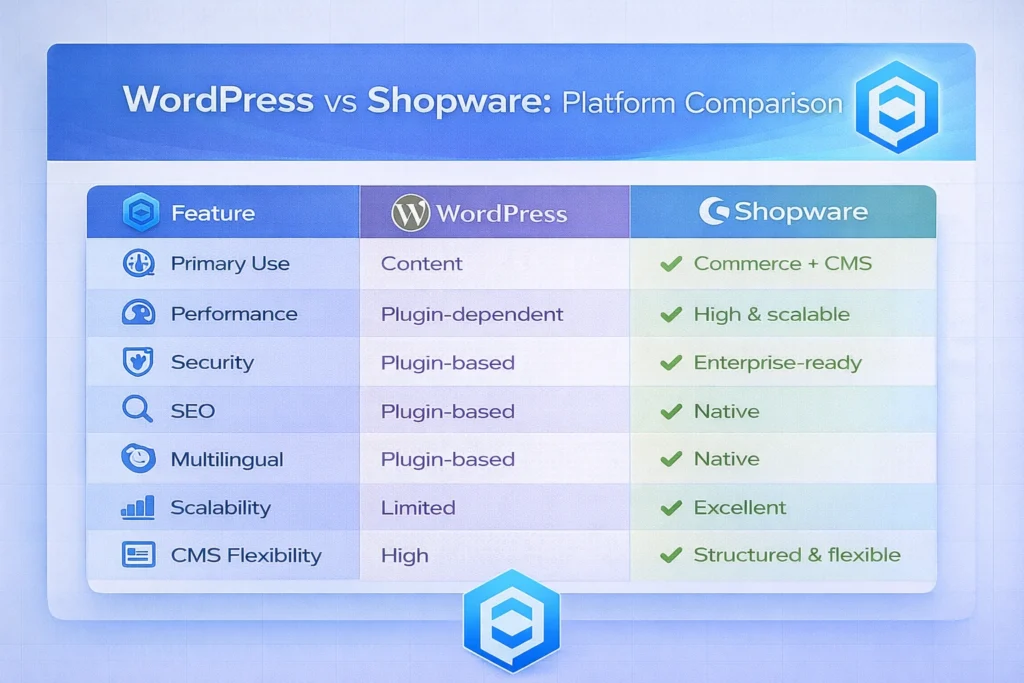
WordPress vs Shopware: Platform Comparison
What Can Be Migrated from WordPress to Shopware?
Migratable Content & Data
-
Pages and posts
-
Categories and tags
-
Media files (images, PDFs, videos)
-
Menus and navigation
-
SEO meta titles & descriptions
-
URLs & permalinks
-
Blog content
-
Multilingual content
Rebuilt or Optimized in Shopware
-
Theme and frontend layout
-
Forms and CTAs
-
Landing pages
-
Interactive components
-
Page performance and UX
The goal is optimization, not just replication.
WordPress to Shopware Migration Without Losing SEO
A major concern is:
“Will migrating from WordPress to Shopware affect my SEO?”
Handled correctly, SEO is preserved or even improved.
SEO Elements Preserved During Migration
-
URL mapping & 301 redirects
-
Meta titles and descriptions
-
Heading structure
-
Image alt text
-
Internal linking
-
Schema markup
-
XML sitemaps
-
hreflang (for multilingual sites)
Common SEO Mistakes We Avoid
-
Changing URLs without redirects
-
Losing blog authority
-
Dropping internal links
-
Ignoring pagination & archives
-
Forgetting media SEO
SEO planning starts before migration begins, not after launch.
WordPress to Shopware Migration Process (Step-by-Step)
Step 1: WordPress Site Audit
-
Content inventory
-
Plugin analysis
-
SEO footprint
-
Traffic & ranking baseline
Step 2: Migration Strategy
-
Content mapping
-
URL & redirect planning
-
CMS structure design
-
SEO risk assessment
Step 3: Data & Content Migration
-
Pages, posts, media
-
SEO metadata
-
Multilingual content
-
Validation checks
Step 4: Shopware CMS & Design
-
Custom Shopware storefront
-
CMS block creation
-
UX improvements
-
Mobile optimization
Step 5: SEO & Performance Optimization
-
Redirect testing
-
Page speed improvements
-
Core Web Vitals optimization
Step 6: Go-Live & Monitoring
-
DNS switch
-
Crawl error monitoring
-
Ranking & traffic tracking
-
Post-launch fixes
WordPress to Shopware Migration Cost & Timeline
Timeline Estimates
-
Small site: 2–4 weeks
-
Medium site: 4–6 weeks
-
Large content site: 6–8 weeks
Cost Factors
-
Number of pages & posts
-
Custom page layouts
-
Multilingual setup
-
SEO complexity
-
Design requirements
Shopware offers lower long-term maintenance costs compared to heavily customized WordPress setups.
CodeCommerce Solutions: Tips & Tricks Nobody Shares
Migration Insights from Real Projects
1. Content Structure Optimization
We convert unstructured WordPress content into structured Shopware CMS blocks for better UX and SEO.
2. Blog Authority Preservation
High-ranking blog posts are migrated with exact URL mapping to protect organic traffic.
3. Redirect Pattern Automation
Instead of manual redirects, we use regex-based logic for scalability and performance.
4. Page Speed Boost
By eliminating plugin bloat, Shopware pages often load significantly faster post-migration.
5. Commerce-Ready Foundation
Even if you don’t sell today, your Shopware site will be ready for future commerce expansion.
WordPress to Shopware Migration Case Studies
Case Study 1: Content-Driven Brand Website (Munich)
Migration: WordPress → Shopware CMS
Pages: 250+
Challenges
-
Slow page load times
-
Plugin conflicts
-
Limited scalability
Solution
-
Full WordPress to Shopware migration
-
Structured CMS layout
-
SEO-safe URL mapping
Outcome
-
Improved page speed
-
Stable SEO performance
-
Easier content management
Case Study 2: Multilingual Corporate Website (Hamburg)
Migration: WordPress → Shopware
Languages: German & English
Solution
-
Multilingual CMS setup
-
SEO-optimized content migration
-
Improved navigation structure
Result
-
Better backend usability
-
Faster publishing workflow
-
Scalable foundation for growth
Why Choose CodeCommerce Solutions for WordPress to Shopware Migration?
-
Expertise in WordPress & Shopware
-
SEO-first migration strategy
-
Strong European market experience
-
Clean, documented migration process
-
Long-term post-launch support
Final Thoughts: Is WordPress to Shopware Migration Worth It?
If your WordPress site feels:
-
Plugin-heavy
-
Hard to maintain
-
Slow under traffic
-
Limited for future commerce
Then migrating to Shopware is a strategic upgrade, not just a CMS change.
Planning a WordPress to Shopware Migration?
Get a free migration assessment from CodeCommerce Solutions and move to a faster, more scalable platform. Hire Shopware developers from us who all are certified and are ready to help you with WordPress to Shopware migration easily, faster and without any data loss. Contact us today!